

Text Editor
An editor for your own files
Open a document from Finder, edit it in your own interface, and save it back. The Editor role limits write-back to the file or folder you opened.
Explore file integrationGive your local web tool a place in the Dock. Turn it into a standalone Mac app with its own icon, native features, and macOS-enforced access limits. Explore the examples.
Mac App Store price is $9.99 USD. One-time purchase. No subscription.
Requires macOS 12 or newer. Regional prices may vary.
Sandboxed builder and exports. Made for personal use and local testing.
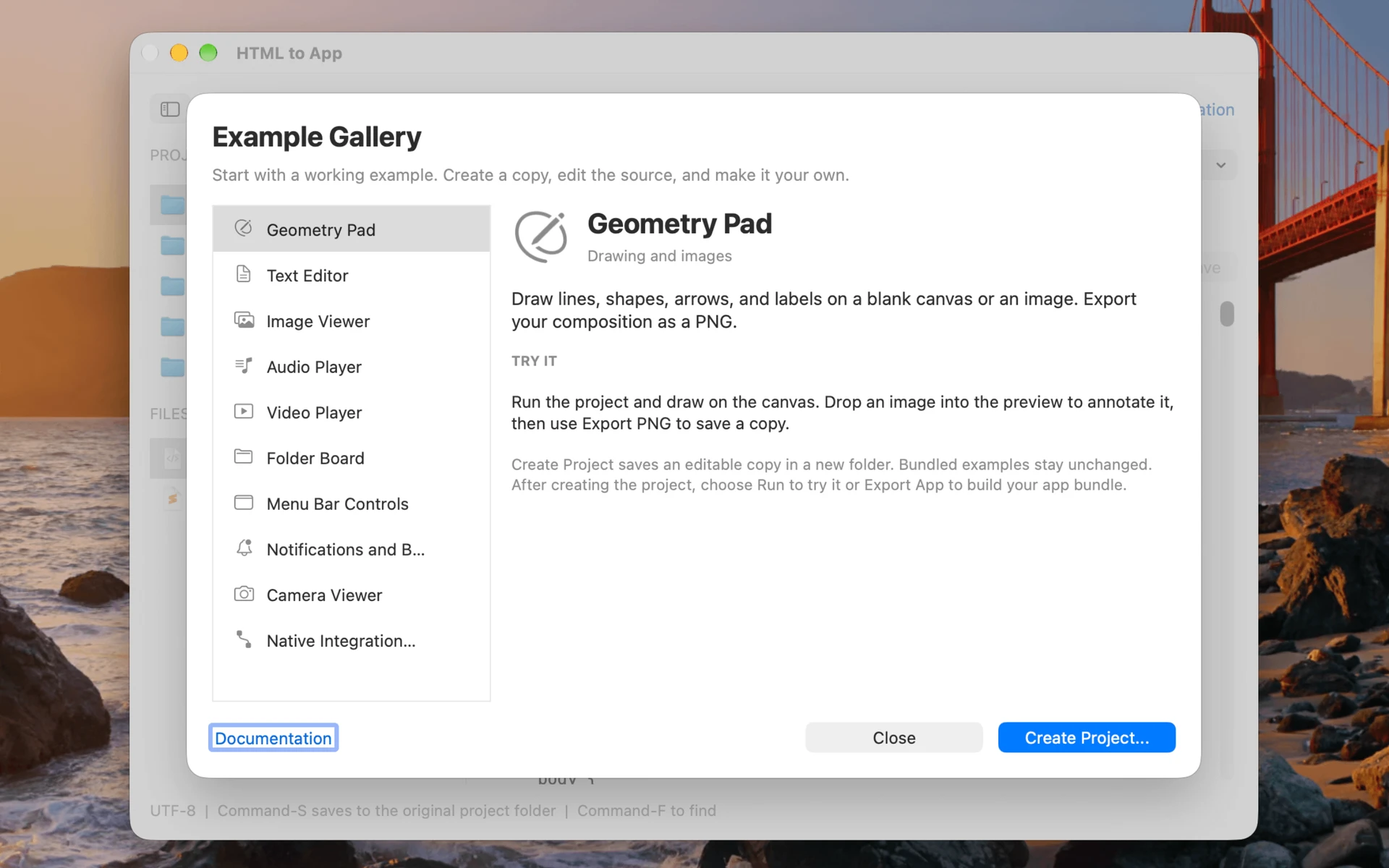
Start with a working example. Make it yours.
The built-in gallery, shown in the app. Select to enlarge.
Start with one of 10 editable examples, then change the source to fit your routine. Use the JavaScript bridge for native features. Your app's structure starts in HTML, with CSS for its look and layout.
Text Editor
Open a document from Finder, edit it in your own interface, and save it back. The Editor role limits write-back to the file or folder you opened.
Explore file integrationAudio and Video Players
Give your local music or videos a dedicated app. Customize the player, register supported files with Finder, and choose an icon you can find in the Dock.
Start from a media exampleNotifications and Menu Bar
Build a timer, status display, or small dashboard with a menu bar control, local notifications, and Dock badges. Notifications require your permission.
Explore native controlsThe gallery also includes drawing, image viewing, folder browsing, and camera examples. Test Finder integration and system permissions in the exported app. See how to make an example your own, or browse the web project examples on GitHub.
Keep your projects local and put macOS App Sandbox around the apps you create. Protection belongs in the workflow, not on a setup checklist.
App-level protection
macOS App Sandbox restricts both the builder and the exported native host, not just the web renderer. File access follows sandbox permissions and authorized locations. Exports include read-only Downloads permission by default.
See exactly what apps can accessA few clicks to export
Package a ready-to-run web project without running its build or install scripts. Export configures a bundled launcher instead of compiling native code. Ordinary shell builds use your account's permissions unless separately restricted.
Compare the security boundariesPrivacy by design
Edit and export without uploading your projects. The app and exported launcher do not collect analytics. Your project's code and online resources can still make network requests.
Read the privacy policySandboxing reduces risk, not the need to trust your code. Review downloaded projects and grant access carefully. The optional first-launch script runs outside App Sandbox after explicit installation. Learn how first launch works.
Open a ready-to-run local front-end project without starting an HTTP server. Choose how your exported app loads its JavaScript, CSS, HTML, and assets.
Embedded content
Package a copy of your web project's files in the app bundle. The exported app does not need the original source folder to load that content.
A good fit for a personal tool you are ready to use. Export again when you want to include source changes.
Original folder
Keep working in your usual editor. Future launches load the current files from your project folder, without exporting again for every source change.
The app gets read-only access to that selected source folder, which must remain available. This is not an automatic live-reload server.
Both modes stay sandboxed and include the default read-only Downloads permission. Self-contained projects work offline. Online resources need a connection, and server-side code such as Node.js or PHP needs a separate backend. Compare the export options.
Build with JavaScript, style with CSS, and start from an HTML entry page. Your source stays in your own folders.
Bring a ready-to-run local web project, or create an editable copy from the built-in Example Gallery. No blank page required.
Change the source, save to your project folder, and run a preview. Check Project helps you find missing local resources before export.
Choose a name, icon, and content mode. Export for your own Mac, follow the first-launch guidance, and open your tool from Finder or the Dock.
Already have a web project? Select its HTML entry page or project folder with Convert HTML to App, without adding a project. Read the project guide, including what to expect on first launch.
Explore the project workspace, Example Gallery, and export settings in these current screenshots. Select an image to see how each part works.
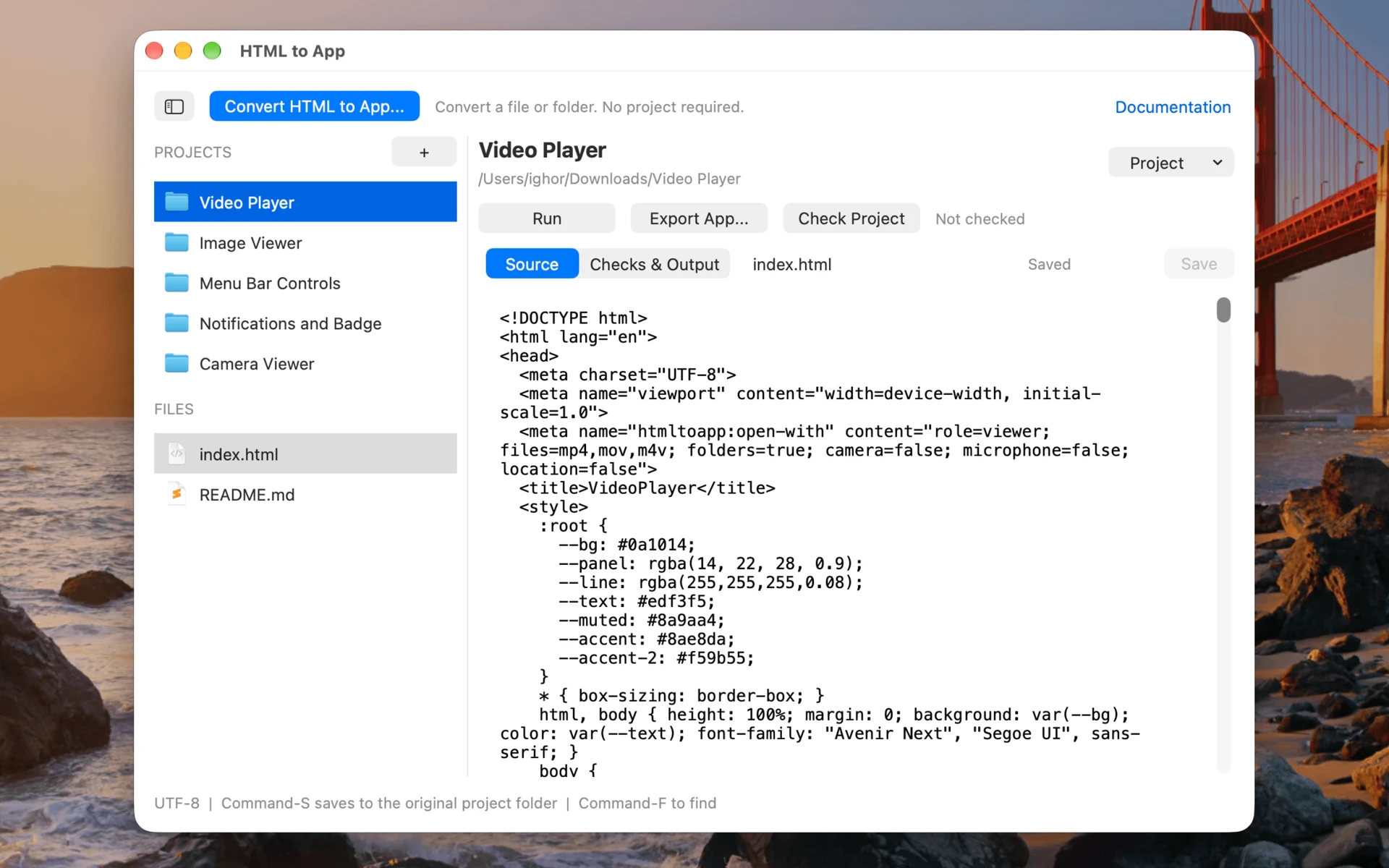
Workspace
Keep multiple project folders in the sidebar and edit their HTML, CSS, JavaScript, and other text files. Save writes to the original folder. Run, Export App, and Check Project are available above the editor.
Open the large image to view it at full size.
A workspace for your own tools and local testing, not a service for publishing or distributing apps.
Save the app, then choose Open App. macOS may ask you to confirm a trusted local export. The completion screen explains manual handling and an optional script you can review and install.
Local launch approval is not signing, notarization, or App Store approval. Read the first-launch guide.
Export copies the bundled, precompiled launcher and configures its resources and settings. It does not compile new native code. Exports are ad hoc signed for personal use and local testing, not notarized or distribution-ready.
The builder's Mac App Store listing does not approve your exports. HTML to App does not replace the Apple Developer Program or Apple's signing and review processes.
The builder and its export process require macOS 12 or newer. Separately, the current exported launcher targets macOS 12 or newer. More questions? Read the FAQ.
Get HTML to App for $9.99 USD on the Mac App Store. One-time purchase. No subscription. You can also get it through Setapp. Regional pricing and availability may vary.
Download
Start with your own project or a working example. Edit, preview, and export a sandboxed app for your Mac. Requires macOS 12 or newer.
Made by Ihor July, the developer behind Parall and DockLock Pro.
Getting started
Open the Example Gallery, create an editable project, and follow the guide to preview and export your first personal tool.
Have a question before you buy? Talk directly to the developer.